DocuMind
A local workspace for ingesting PDF and text files, searching indexed passages, and opening results at their sources.
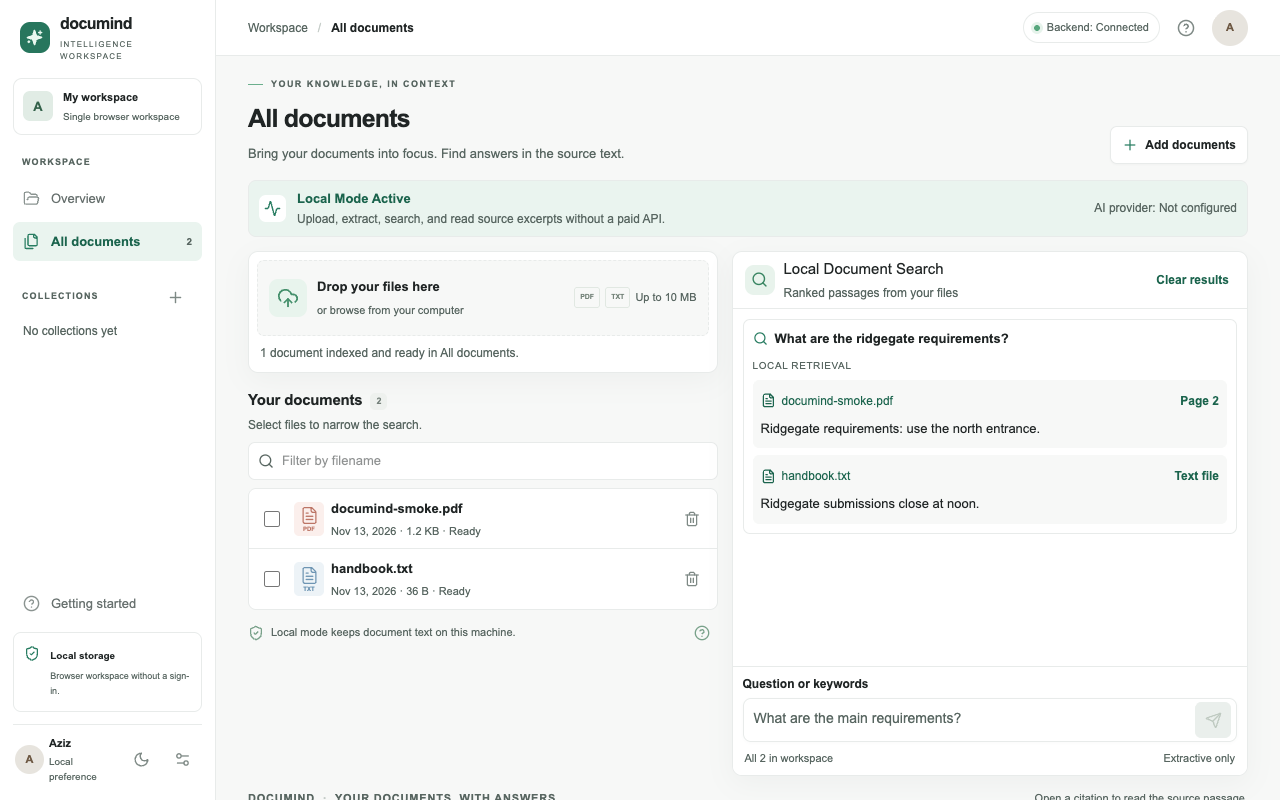
DocuMind is a locally running MVP and has not been deployed. There is no public live demo.
Problem and objectives
Finding a specific requirement across several documents often means opening each file, guessing what to search for, and checking the surrounding text. Requiring an AI key adds friction before the first search.
Solution
Upload a text-based PDF or UTF-8 TXT file, search its indexed passages locally, and open a citation at the exact extracted passage and PDF page. Collections and file selection narrow the search. OpenAI generation is available only as an explicit option.
Technology stack
Architecture
The Next.js, React, and TypeScript dashboard sends uploads and searches to a Python FastAPI backend. PyMuPDF extracts page-aware text from PDFs; UTF-8 TXT content is decoded directly. The backend normalizes and chunks extracted text while retaining source page numbers.
SQLite stores extracted passages, document metadata, and collections. SQLite FTS5 with Porter stemming and Unicode tokenization indexes passages; BM25 and query-term coverage rank scoped results. Each citation carries a stable passage ID, filename, and page number so the UI can open the matching source text.
Docker Compose runs the frontend and backend locally. The default local search returns verbatim excerpts without calling an AI provider. If the user explicitly enables OpenAI mode, the question and retrieved passages may be sent to OpenAI for a generated answer.
Privacy-conscious local processing
In local mode, uploaded files are parsed by the local backend and only extracted text, document metadata, and search data are stored in the local SQLite database; original file bytes are not stored.
Local uploads and searches do not call an AI provider. Explicit OpenAI mode sends the question and retrieved excerpts to the provider. The app has no sign-in and is not suitable for public multi-user hosting as-is.
Features
- Ingest text-based PDFs and UTF-8 TXT files, inspect the extracted passages, and remove a document and its search index entries.
- Create, rename, and populate collections, then scope retrieval to a collection or selected documents.
- Search locally with BM25-ranked verbatim excerpts and open each citation at its exact extracted passage and PDF page.
- Optionally request a generated answer through an explicit OpenAI setting; local search remains available without credentials.
Technical challenges
- Preserving page-accurate citations through extraction, overlapping chunking, retrieval, and the document viewer required stable passage IDs and source page metadata.
- Keeping the FTS index aligned with stored passages required a migration/backfill path and SQLite triggers for passage insertion and deletion.
- Separating local retrieval from optional generation keeps the core search usable without credentials and makes the external data transfer an explicit choice.
Lessons learned
- Ranked excerpts let users verify results in their source documents. Search uses English stemming and a limited local synonym list, so broad queries and other languages can produce uneven results.
- Scanned image PDFs need OCR before upload, and complex PDF layouts may extract out of order.
- The workspace is designed for local use, not public multi-user hosting. Workspace UUIDs are not authentication, so public hosting would need authentication and server-side authorization.